I have a wishlists for interesting GNOME applets that (since no-one
volunteered) I'm now implementing myself ;) I'm only now starting
to program in Mono/Gtk-sharp and it goes very well.
If you have an interesting GNOME applet idea or you have improvements
to this document, please !
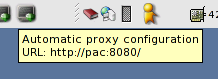
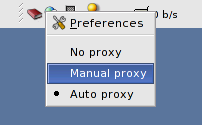
An applet that allows you to change your GNOME Proxy configuration with a single click.
Galeon used to have a single click 'Network Proxy selector' in their menu,
which I used frequently. In a discussion with Epiphany developers about
this same functionality (using GConf) they argued that you could already
move the Proxy Network capplet to your taskbar.
But that doesn't offer all the functionality I'm looking for. What I
think would be neat is:
- An applet that gives you a list of preset configurations upon a
single click.
- Each configuration is called a 'location' and could either mean:
- No proxy
- Manually configured proxy
- Proxy Auto Configuration (PAC)
- A remote URL, eg. http://pac.isp.net/path/file.pac
- A local URI, eg. file:///home/user/pacs/location.pac
- When you select another location, the applet should replace your
GConf settings accordingly. (GConf key: /system/http_proxy)
- A preferences dialog should allow to manage locations and even test
a location (see if proxy works or check PAC syntax ?).
- In a later phase there might even be an automatic selection based
on eg. the network-configuration (ip-address, network, gateway, ??).
So the applet has to monitor the network configuration for changes.
- When using tsocks or dante lib, we could have a dialog to socksify
the complete system. (Add it to /etc/ld.so.preload or run /etc/init.d/tsocks)
A first basic implementation is in the file and
packages can be found at .
An applet that shows active network interfaces and their network-configuration.
Windows XP has a useful
that shows the state of an interface (similar as what mii-tool gives).
There's already a
and a
but those are mainly made to see the bandwidth usage and are not similar to what the Windows XP applet does.
The applet would do the following:
- Have a GUI to select the interfaces you want in your Panel
notification area.
- Monitor the interface and upon change indicate it by displaying
the tooltip for a couple of seconds.
- It shows graphically whether an interface is up. A tooltip gives
more information about the state of the interface. (And maybe some stats)
- If you click the applet, you get a 'pull-down' dialog, much like
the default GNOME Clock applet. A user should be able to
copy&paste the network interface configuration.
You can find RPM packages containing the netspeed_applet at:
An applet that enables your current GNOME session to be VNC (RFB)-aware.
used to have a
that actually does what I want. But they used the Xclasses
toolkit and it doesn't work with a GNOME 2 taskbar.
Eventually it should give the same functionality as the
for configuring the VNC server and providing the user with information
on the network IP configuration.
You can find RPM packages containing x0rfbserver at:
An applet that gives you fast access to a phonetic alphabet of your choice with a single click.
I often find myself spelling out passwords or URLs over the phone with my own
made-up alphabet which often leads to more confusion.
The applet would consists of:
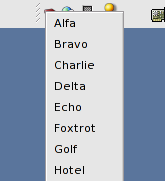
- A drop-down list of the implemented phonetic alphabets (or maybe
a configured list). A list of phonetic alphabets is found at:
- When clicking the applet, it should show the alphabet
in a window that stays visible much like the default GNOME Clock
applet, but maybe on top. So that you can look at it while working
and answering the phone.
A first implementation is in the file and
packages can be found at .
Here is a screenshot of the basic version:
Here's a list of other useful (non-default) GNOME applets I'm using:
Here's a list of some GNOME tray applets:
I couldn't find a lot of documentation on writing applets. Here's what I found: